Meshtastic T-Deck+ users ask which firmware file to flash
The fix is simple once you map the labels: standard firmware, .factory, TFT, and littlefs each match a different T-Deck+ flash state. Meshtastic’s naming still makes that harder than it should be.
One glance at the T-Deck+ firmware list is enough to stop a clean install cold. The question in Meshtastic’s July 1 GitHub discussion was not abstract at all: when a launcher offers firmware-t-deck, firmware-t-deck-tft, .factory variants, and littlefs images, which one belongs on the board right now? On a handheld that can swap between MeshCore and Meshtastic, the wrong pick is not just confusing, it can mean a failed flash or a device that comes back without the resources it needs.
What each file name is trying to tell you
The filenames in the thread point to different jobs, not duplicate copies of the same image. The plain firmware-t-deck-2.7.26.54e0d8d.bin is the core firmware image for the T-Deck line, while firmware-t-deck-2.7.26.54e0d8d.factory.bin is the clean-slate version meant for a full reinstall after flash is erased. The same pattern appears again in the TFT-specific branch, with firmware-t-deck-tft-2.7.26.54e0d8d.bin and firmware-t-deck-tft-2.7.26.54e0d8d.factory.bin.
The littlefs files are a different category altogether. Meshtastic’s downloads documentation notes that some devices are flashed via filesystem, which is why littlefs-t-deck-2.7.26.54e0d8d.bin and littlefs-t-deck-tft-2.7.26.54e0d8d.bin appear alongside the main firmware payloads. In plain terms, the launcher is not just asking which firmware you want, it is asking whether you are loading the application, rebuilding from scratch, or writing storage content tied to the device layout.
Why the T-Deck+ creates this kind of confusion
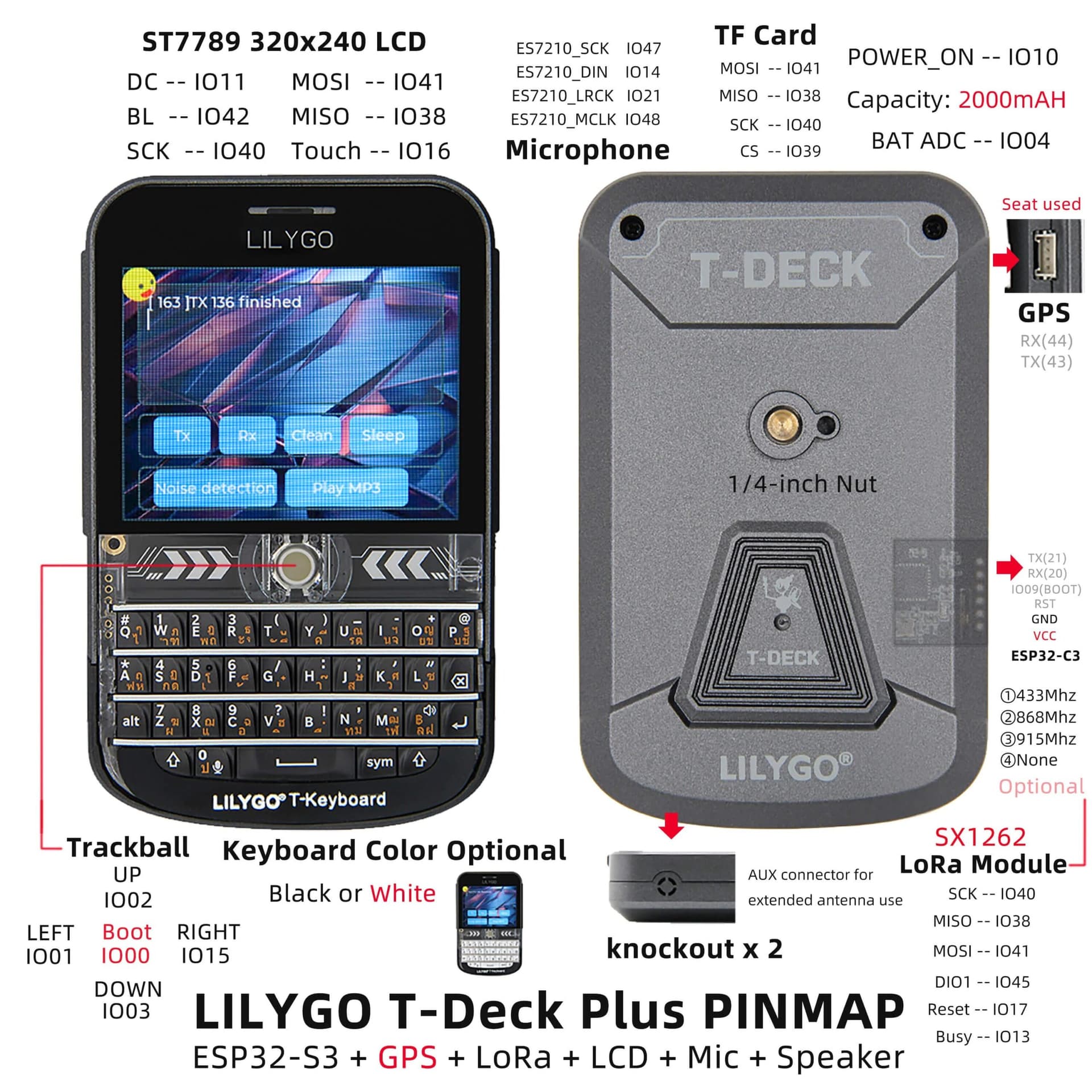
The T-Deck series is not a simple single-board Meshtastic node. Meshtastic describes the family as compact handheld keyboard devices with touchscreen displays, and the T-Deck Plus adds GPS and a 2000 mAh battery on top of that. The base T-Deck uses an ESP32-S3 dual-core processor plus a secondary ESP32-C3 MCU for the keyboard, so there is more going on under the hood than on a typical radio-only board.
That hardware mix is part of why firmware naming gets messy. Meshtastic also distinguishes between the original LCD T-Deck and T-Deck Plus, which support MUI, and the newer T-Deck Pro, which is an e-ink model. Once a device family spans different displays, touch stacks, keyboard controllers, and storage layouts, one filename is rarely enough to explain what should be flashed.
The latest v2.7.26.54e0d8d release reinforces that the T-Deck line is still being tuned. Those notes warn T-Deck users to run screen calibration in MUI tools if touch accuracy looks off, and they also include a T-Deck Plus touch-driver fix. That matters because a user comparing firmware families across different mesh stacks is not just chasing features, they are also trying to keep the screen usable after the flash.
The safest way to flash a T-Deck+
The easiest way to avoid a bad flash is to decide first whether you are updating an existing Meshtastic install or starting from a wiped board. Meshtastic’s T-Deck documentation recommends the official Web Flasher, and says ESP32-S3 devices like the T-Deck usually need Espressif firmware download mode before flashing. The same guidance calls out the 1200bps reset button in the web flasher, which is there to get the device into the right state for installation.
1. If you are doing a normal update on a T-Deck+, start with the standard T-Deck firmware image that matches the build you want.
2. If you are moving from another firmware family or want a clean install, erase flash first and use the .factory build.
3. If you are working with the TFT branch, use the TFT-specific firmware or its factory version, not the plain T-Deck image.
4. Only use the littlefs image when the install path calls for filesystem data, since it is not the main application binary.
That sequence lines up with earlier Meshtastic TFT guidance as well. In a February 2025 T-Deck TFT discussion, users described building the t-deck-tft environment and then flashing firmware.factory.bin after erasing flash, while a maintainer pointed people to Discord for updated TFT build instructions. The pattern is consistent: when the device is using a specialized display branch, the clean install path is part of the package name itself.
Why this keeps coming up in Meshtastic
The unanswered July thread is useful because it shows the packaging problem in real time. Even experienced LoRa users can get stuck once a single board is expected to juggle multiple targets, different build environments, and different storage layouts. Meshtastic’s own firmware development stack uses PlatformIO, which is built for multi-platform development and centralized tooling, and that makes the artifact list richer, but also easier to misread when you only want the one file that will boot.
This is not a one-off T-Deck+ quirk either. A November 2024 T-Deck Plus discussion shows another newcomer asking where the branch or folder for T-Deck Plus lived and being told to follow the standard build docs, which tells you the confusion reaches beyond flashing and into compilation. Put the 2024 TFT build thread next to the 2026 label question, and the pattern is clear: the hardware is capable, but the naming still asks users to know more than the filename reveals.
The practical read on the July question is simple. If the board needs a normal Meshtastic image, the plain T-Deck firmware is the starting point. If you are doing a full wipe, a TFT branch, or a filesystem-based install, the labels are the warning signs that tell you which path to take before the flash goes sideways.
This article was produced by Prism’s automated news system from verified source data, official records, and press releases, then run through automated quality and moderation checks before publishing. The system is built and supervised by the people who set the standards it runs under. Read our full AI policy.
Did this article answer your question?