NBA 2K26 guide explains how to add friends and enable crossplay
NBA 2K26 keeps the friend flow simple once you know the path: turn on crossplay, hit Social, search the username, and you’re in a lobby fast.
The fastest way into a game with friends is not buried that deep
NBA 2K26 solves a problem every regular player knows too well: the squad is ready, but the menu maze gets in the way. The good news is that the cleanest path is short once you know where to look. Turn on crossplay first, then use the Social menu to add a 2K Friend by username, and you can get from the home screen to a match without wandering through every mode on the board.
The game’s online setup matters because NBA 2K26 leans hard into multiplayer across The City, Play Now, and MyTEAM. That means you are not just trying to squad up for one mode, you are trying to keep the same friends list working whether you are jumping into casual games, organized runs, or more competitive sessions. The official pitch around The City and the game’s “challenge your friends, or rivals” framing makes it clear that the social side is part of the core experience, not an afterthought.
Turn on crossplay before you do anything else
If your group plays across consoles, crossplay is the first box to check. In NBA 2K26, crossplay is available between PlayStation 5 and Xbox Series X|S, and that is the lane you need for mixed-console squads. It also covers cross-platform competition in co-op matches and online tournaments on those consoles, so it is useful whether you are just running quick games or trying to stay together in more structured play.
The menu path is straightforward once you know it: from the home screen, go to the Features tab, open Settings, then scroll down to Crossplay and make sure it is enabled. That is the step people miss most often, especially when they assume the game will simply detect the group and sort it out on its own. It will not. If crossplay is off, the rest of the setup can look broken even when nothing is actually wrong.
A couple of details are worth keeping straight:
- Crossplay in NBA 2K26 is between PlayStation 5 and Xbox Series X|S only.
- Gen 9 versions also include Steam for PC and Nintendo Switch 2, but that does not change the actual crossplay lane.
- If you are building a mixed-console group, this is the setting that keeps the party from splitting apart before it starts.
The friend-add flow is built to be simple, if you follow the right menu path
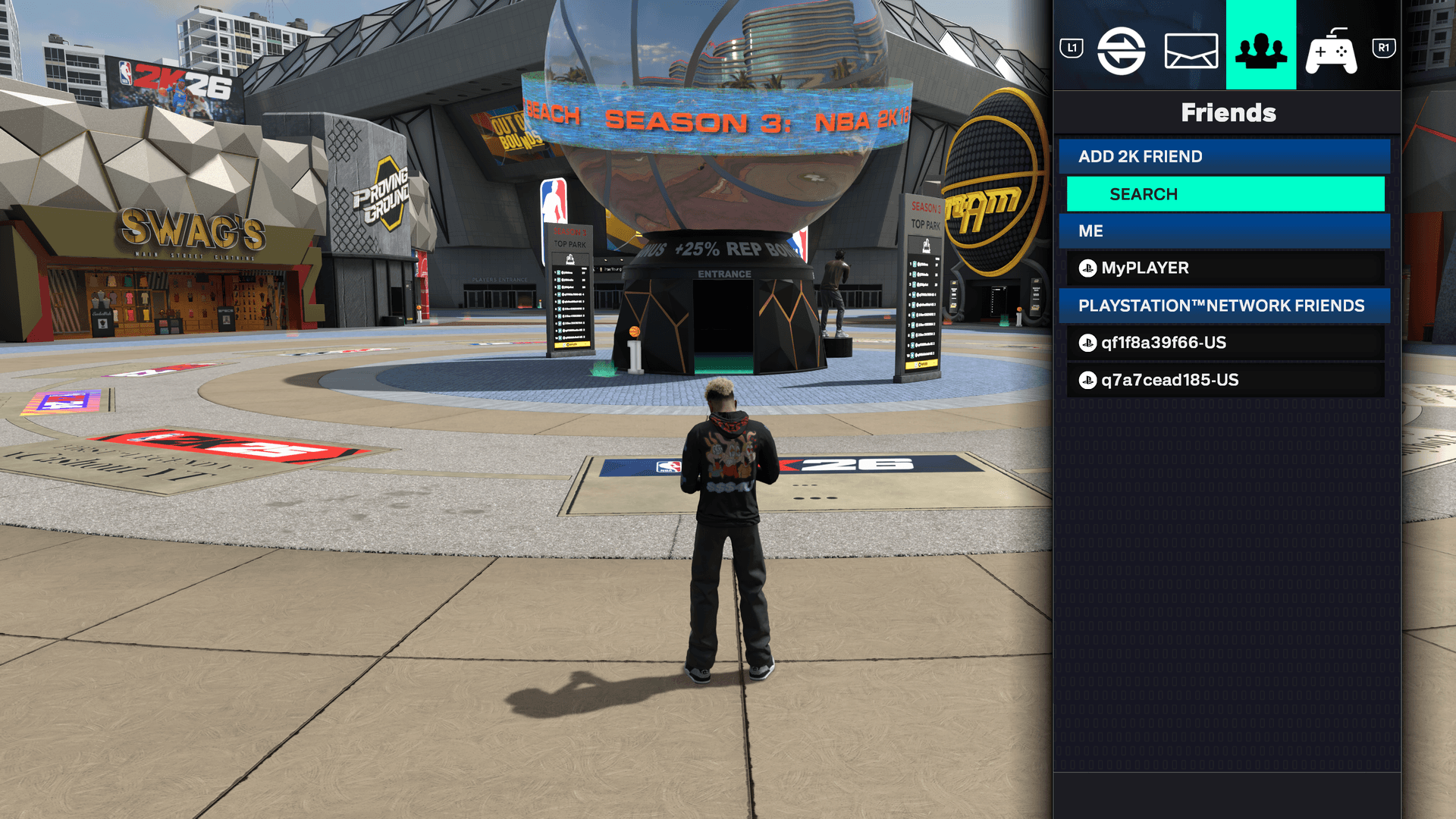
Once crossplay is on, adding friends is direct. From the home screen, or while you are in The City, open the Social menu. On PlayStation, that means pressing L1 and R1 together. On Xbox, it is LB and RB together. That brings up the social hub without making you hunt through mode-specific menus.
From there, move to the Friends tab, choose Search under Add 2K Friend, and enter the other player’s username. Send the request and wait for it to be accepted. That is the whole flow. There is no need to bounce between multiple screens or guess whether the invite belongs in Play Now, MyTEAM, or somewhere else first.

That username step is where most of the friction lives, because people often know the person they want to play with but do not have the exact 2K name ready. If you are setting up a session for the first time, make sure you have that handled before you start clicking around. The system is built for precision: one correct username, one request, one accepted connection.
Where you can actually link up once the request is in
NBA 2K26 gives you a few different places to use that friends setup, and that is part of why the social flow matters so much. You can link up with friends in The City, in Play Now, or in MyTEAM, depending on what kind of game you want to run. That flexibility is useful, but only if the friend list is already in place and crossplay is active.
In practice, that means you should treat the Social menu as your home base. If your crew likes to hop between modes, you do not want to rebuild the connection every time you switch from a quick exhibition to a MyTEAM session. The friend request system is the boring part that saves time later, and in NBA 2K that boring part is usually the difference between playing and spending twenty minutes in menus.
What the platform lineup means for your group
| The platform picture in NBA 2K26 is wider than the crossplay lane, and that distinction matters. The Gen 9 version is available on PlayStation 5, Xbox Series X | S, Steam for PC, and Nintendo Switch 2. The broader launch lineup also included PlayStation 4, Xbox One, PC via Steam, and Nintendo Switch, while Early Access for the Superstar Edition and Leave No Doubt Edition began on August 29, 2025. The worldwide release followed on September 5, 2025. |
|---|---|
| That spread explains why players get confused about who can play with whom. Availability is not the same thing as crossplay support. Just because a version exists on a platform does not mean that platform is part of the crossplay group. For NBA 2K26, the official crossplay answer stays narrow: PlayStation 5 and Xbox Series X | S, with co-op matches and online tournaments included. |
The least confusing path is also the fastest one
If you want the friction-free version, the whole process is really just three beats. First, turn on crossplay in Features, Settings, and Crossplay. Second, open Social from the home screen or The City with L1 plus R1 on PlayStation or LB plus RB on Xbox. Third, go to Friends, hit Search under Add 2K Friend, and send the username request.
That path is short because it is supposed to be. NBA 2K26’s online setup is built for players who want to get into games with friends fast, not players who want to spelunk through menus. Once crossplay is enabled and the username is in the system, the rest of the experience finally matches the way people actually play the game: quick, social, and ready for the next run.
This article was produced by Prism’s automated news system from verified source data, official records, and press releases, then run through automated quality and moderation checks before publishing. The system is built and supervised by the people who set the standards it runs under. Read our full AI policy.
Did this article answer your question?