EA’s Sims 4 tips page highlights hotkeys, cheats, and Gallery basics
EA’s Sims 4 tips page is a useful refresher: hotkeys, Gallery downloads, premades, and cheats all shave time off the parts veterans still fumble.
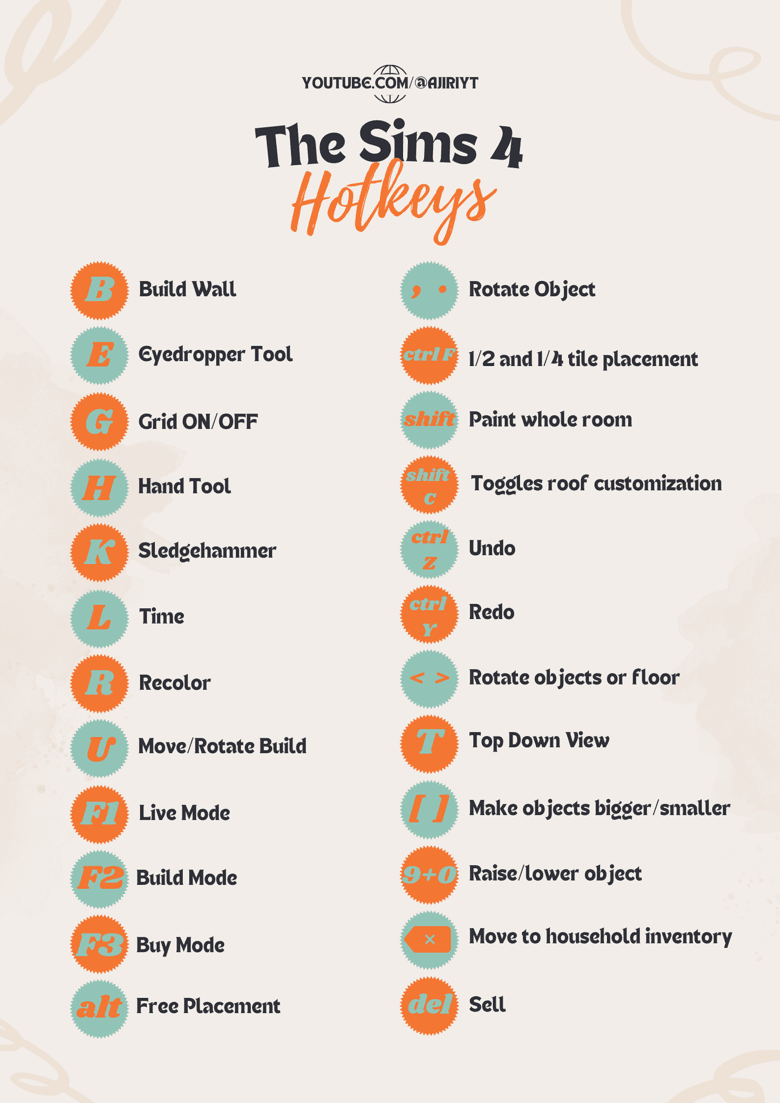
The Sims 4 gets much easier the moment you stop treating every action like a menu hunt. EA’s tips page is aimed at newcomers, but it is also a clean reminder of the shortcuts and systems that keep a save moving, from faster camera control to Gallery downloads and the cheat console.
The hotkeys that save the most time
The most useful part of the page is not flashy, and that is exactly why it matters. EA puts the everyday controls front and center: pausing, changing game speed, moving the camera, switching between Sims in the household, and jumping straight into Build Mode without clicking through layers of menus. If you spend any real time in a legacy save or a heavily edited neighborhood, those are the actions that separate a smooth session from a slog.
The build-focused controls are where the page becomes a genuine quality-of-life refresher. EA calls out undo and redo, rotating objects, deleting items, moving objects off-grid, toggling the grid, and placing floor tiles or walls more efficiently. That is the stuff builders forget until they are already fighting with a weird placement issue, and then suddenly the simplest shortcut in the game feels like a lifesaver.
For players who build a lot, the takeaway is simple: muscle memory is part of the game. The fewer times you stop to wrestle with the interface, the more time you spend shaping a room, fixing a lot, or iterating on a layout until it actually works.
- Pause and speed controls keep live play from running away from you.
- Camera movement and household switching make it easier to manage multi-Sim homes.
- Build Mode shortcuts cut down on the little frustrations that usually break your rhythm.
- Grid toggles and off-grid placement are the difference between a clean build and one that feels cramped or rigid.
The Gallery is the fastest way to borrow inspiration
EA Help describes the Gallery as a way to share creativity with the global Sims 4 community, and that is the right frame for it. You can upload and download Households, Rooms, and Lots, which makes the Gallery useful whether you want a full house, a single room, or a whole family to drop into a save. It is one of the easiest ways to get a custom look without starting from scratch.
The page also asks you to log in with an EA account so you can like, comment on, share, and save creations for download into The Sims 4. That social layer matters more than it sounds like it should, because the Gallery is not just a catalog of builds, it is a practical pipeline for inspiration, fast setup, and recovery when you do not feel like constructing every little detail yourself.
This is especially handy when you want a house that already has a clear style or a household that feels ready-made for a story beat. Instead of spending an hour on a shell of a lot, you can pull in a room or full build and immediately start adjusting the parts that matter to your save.
Premade Sims and houses are still worth using
It is easy to dismiss premade Sims and homes as starter content, but EA’s tips page makes a better case for them than that. If you want to jump straight into Live Mode, premade Sims and houses let you skip the Create-a-Sim and Build Mode grind and get to the actual play faster. For anyone who has already spent enough evenings perfecting jawlines and kitchen islands, that shortcut is not laziness, it is a deliberate choice.
That reminder fits The Sims 4’s broader design. EA’s current hub describes the game as a life simulation where you create and customize Sims and homes, which means the game is built to support more than one playstyle. Some saves are about meticulous setup, while others are about getting a household on the lot and seeing what happens next.
The useful habit here is to treat premades as a launch point, not a compromise. If your real goal is storytelling, drama, or an experiment with a specific life path, starting with an already-built household often gets you to the interesting part sooner.
Cheats are part of normal play, not a last resort
EA’s cheats FAQ keeps the process blunt: on PC and Mac, open the cheat console with Ctrl+Shift+C while in game. That tiny detail matters because it is the gateway to testing, storytelling, and cleanup work that would otherwise take far longer. Cheats are not just for skipping difficulty, they are also useful when you want to reset a story, troubleshoot a weird situation, or push a save in a direction that would be annoying to reach naturally.
The console caveat on other platforms is worth remembering too. EA notes that enabling some cheats on console disables Achievements and Trophies for that current save. That is the tradeoff, and it should be treated as one: if that save is your main progression file, think before you switch cheats on.
For everyday play, the useful mindset is to stop treating cheats like a guilty secret. The Sims has always been a sandbox first and a rulebook second, and EA’s own FAQ makes clear that the cheat console is part of how the game is meant to be used.
Why this refresher still lands for long-time players
The Sims 4 has been around since EA’s launch announcement for September 2, 2014 in North America, and it opened the door even wider when the base game became free for new players on October 18, 2022 across PC, Mac, Steam, PlayStation 5, PlayStation 4, Xbox Series X|S, and Xbox One. That kind of lifespan creates a familiar problem: players return after a break, then forget the small controls that used to feel automatic.
That is why this page works better as a veteran refresher than as a beginner handout. The useful habits in The Sims 4 are rarely dramatic, but they add up fast: fewer menu clicks, fewer build mistakes, faster setup, and less time spent fighting the interface when you would rather be telling the story.
This article was produced by Prism’s automated news system from verified source data, official records, and press releases, then run through automated quality and moderation checks before publishing. The system is built and supervised by the people who set the standards it runs under. Read our full AI policy.
Did this article answer your question?