Microsoft Design rethinks Copilot as a thought partner in work flows
Microsoft is redesigning Copilot as a thought partner, signaling that AI now has to feel trustworthy inside work, not just powerful on paper.
Copilot is moving from assistant to collaborator
Microsoft Design is making a bigger point than a UI refresh: Copilot is being recast as a thought partner, and that changes what good software feels like at work. The classic toolbar-and-menu model was built for commands; this new model is built for guidance, anticipation, and back-and-forth collaboration. In Microsoft’s framing, the Copilot Design System is the backbone of that experience, meant to make AI feel intentional, humane, and coherent across complex product surfaces.

That matters because design is no longer just about visual polish. It is now the orchestration layer that shapes how AI behaves, how much users trust it, and how human-human, human-AI, and human-AI-human collaboration actually works in practice. For anyone building workplace software, especially inside monday.com, the message is blunt: AI features will be judged less by whether they exist and more by whether they fit naturally into the flow of work.
Why the interface shift is really a culture shift
Microsoft’s earlier Copilot writing described the product as a 'conversational UX' frontier and tied that frontier to ethical considerations. That framing is important because it moves the conversation away from “How powerful is the model?” and toward “How should the system behave when people rely on it?” Once software starts talking, summarizing, and suggesting, every response becomes part of the employee experience, not just a technical output.
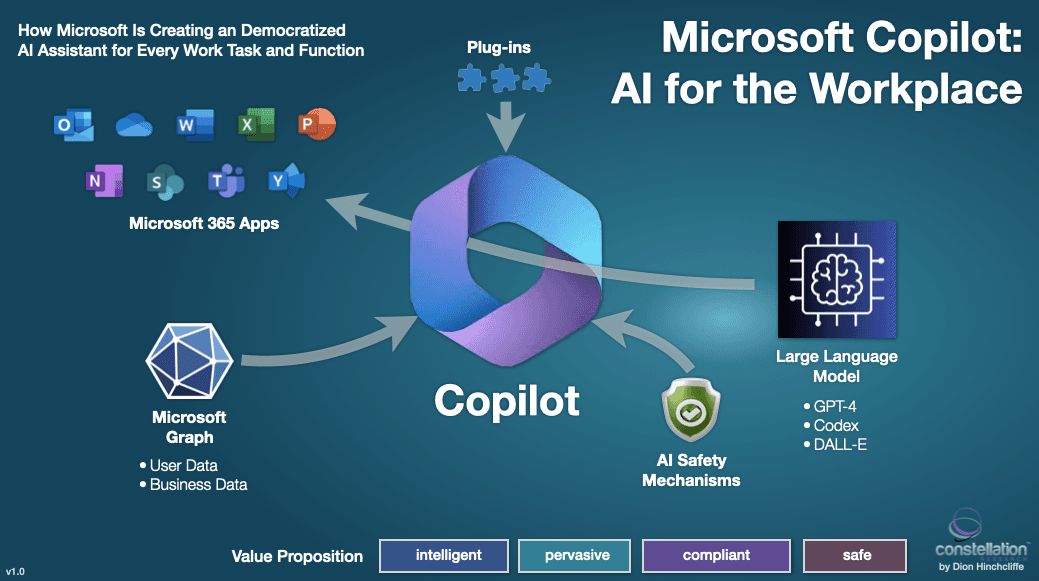
The redesign also reflects a broader platform-level shift inside Microsoft. In March 2026, the company said Copilot would span four connected pillars: Copilot experience, Copilot platform, Microsoft 365 apps, and AI models. Jon Friedman then added another signal on May 14, 2026, when he said he had become Microsoft’s first Chief Design Officer. That kind of title change tells you where the company thinks the leverage now is: not just in the model stack, but in the system that shapes how people encounter it.
For monday.com employees, that is a useful warning and opportunity. Engineers need to think in terms of state, handoffs, escalation paths, and failure modes. Product managers need to decide whether an AI response is useful at the moment a user is exploring, deciding, or refining work. Sales teams need a clean story for enterprise buyers who will increasingly ask whether AI is governed, explainable, and consistent across every workflow, not just whether it is flashy.
What this means for workplace software like monday.com
Microsoft’s move is bigger than Microsoft. It raises the bar for the whole category of work software, including platforms like monday.com that sit between project coordination, automation, and AI-assisted execution. If Copilot is becoming a thought partner, then every competing workplace system has to answer a new expectation: can the product guide work without getting in the way of it?
That expectation changes what users will tolerate. Workers who have become accustomed to AI that summarizes meetings or drafts text will now expect software to anticipate next steps, not simply respond on demand. They will also expect consistency across surfaces, because a helpful assistant in one app and a confusing one in another feels like a broken workplace, not a helpful one.
For monday.com, that pressure lands in a very practical place. The company already positions itself as a work OS, which means it is not selling a single feature; it is selling a coordinated operating experience. In that context, Microsoft’s design shift reinforces a key principle: AI has to be woven into workflows so people can move faster without having to mentally switch between tools, modes, or levels of trust.
How the monday.com-Microsoft connection fits into this shift
The connection between the two companies is already concrete. Microsoft’s official connector documentation says monday.com content can surface inside Microsoft 365 Copilot, Copilot Search, Microsoft Search, Teams, Outlook, and SharePoint. It also says the connector uses existing permissions, so people only see data they are already allowed to access. That detail matters because it turns governance from an abstract talking point into a user experience feature.
monday.com’s own Microsoft 365 Copilot integration goes a step further, letting people create, update, and analyze work without leaving Microsoft apps. In other words, the software is not just answering questions about work. It is participating in the work itself. That is exactly the kind of embedded experience Microsoft is now trying to design around, and it is the direction enterprise buyers are likely to reward.
There is also a broader platform story here. monday.com says it is building no-code agents that can orchestrate multi-step processes and adapt as conditions change. That puts the company squarely in the same conversation Microsoft is having about systems that do more than autocomplete tasks. The difference between a useful AI layer and a noisy one will come down to how well the software understands context, permissions, and timing.
Why this matters for product, engineering, and sales teams
The practical takeaway for monday.com teams is not that every product should mimic Copilot. It is that AI is increasingly a systems design problem.
For engineers
- Build for handoffs, not just outputs.
- Make failure states legible when AI cannot answer confidently.
- Treat permissions, provenance, and escalation paths as core product logic, not afterthoughts.
For product managers
- Ask whether the AI intervention is useful at the exact moment the user sees it.
- Design for exploration, decision-making, and refinement as different states.
- Measure whether the experience reduces friction across the workflow, not only whether it increases usage.
For sales teams
- Expect enterprise buyers to care about consistency as much as capability.
- Make governance and permissions part of the story from the start.
- Show how AI fits into existing workflows instead of pitching it as a bolt-on feature.
This is where Microsoft’s design language becomes commercially relevant. A system that feels coherent is easier to adopt, easier to trust, and easier to explain inside a large organization. That is especially true when AI is surfacing inside apps people already use every day, where one bad interaction can erode confidence fast.
The bigger signal for the work software market
Microsoft says it wants to build at the speed of life, not AI hype, and to co-create with users throughout the process. That stance matters because it rejects the idea that AI adoption is just a race to ship more automation. It suggests that the winning products will be the ones that feel grounded in real work patterns, where summaries, suggestions, and workflow guidance show up as a service to the user rather than as a spectacle.
The numbers around monday.com underline why that matters. The company says it serves more than 250,000 customers, and it points to outcomes like Pepsi cutting low-impact work by 30% while meeting 100% of critical deadlines, and Five9 reducing time to revenue by 25% through AI-powered workflows. Those are not abstract AI wins. They are business outcomes tied to how work actually moves.
That is the standard Microsoft’s redesign raises for everyone in workplace software. The next phase of AI will not be won by the loudest model claims. It will be won by the systems that feel most dependable when a person is trying to get real work done.
This article was produced by Prism’s automated news system from verified source data, official records, and press releases, then run through automated quality and moderation checks before publishing. The system is built and supervised by the people who set the standards it runs under. Read our full AI policy.
Did this article answer your question?