monday.com urges teams to leave buffer time in resource planning
monday.com is telling teams to plan for slack, not perfection. Its 75% to 80% utilization rule treats buffer time as a safeguard against delays, rework, and burnout.
monday.com is making a simple but hard-earned point: resource planning should help teams spot overload before it turns into missed deadlines and exhausted people. The company’s own guidance frames resource management as the process of planning, scheduling, and allocating people, budgets, and tools so projects get delivered on time, and its newer advice pushes teams to leave room for the unexpected instead of trying to drive every person to full capacity.
Resource management is an early warning system
For engineers, product managers, and sales leaders inside a fast-moving SaaS company, the value of resource management is not administrative neatness. It is visibility. When every request is treated as equally urgent, a team can look fine on paper and still be headed for trouble, because the real problem is not only who is assigned to what, but whether they still have room to absorb meetings, admin work, and last-minute changes.
That is why monday.com’s resource guidance emphasizes capacity as a live signal, not a static spreadsheet. The company says real-time tracking across projects helps managers keep work on time and avoid bottlenecks, which matters when one overbooked team can slow down everything from product delivery to customer onboarding. In practice, this means managers need to see pressure building before deadlines slip, not after the calendar has already filled.
Why 75% to 80% beats 100%
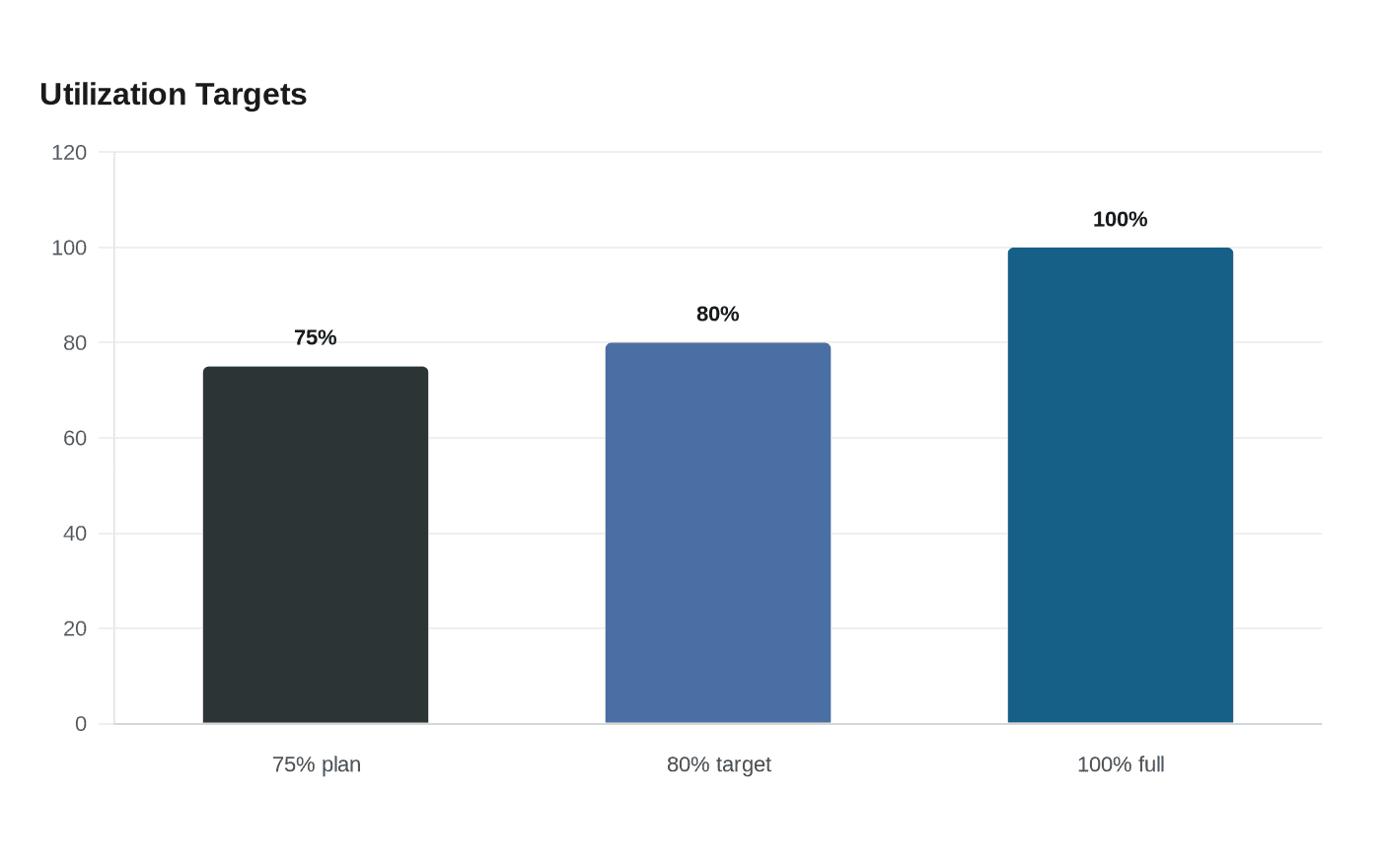
The clearest shift in monday.com’s newer resource-allocation guidance is the recommendation to plan for 75% to 80% utilization instead of 100%. That buffer is not wasted space. It is what protects delivery when the day gets interrupted by meetings, admin tasks, or unexpected issues that no plan can fully eliminate.
That advice also reflects a more realistic view of how high-performing teams work. Pushing everyone to full capacity may look efficient, but it usually guarantees delays when surprises hit. The company’s own best-practice material also points toward an 80% utilization target for teams that face constant interrupts, because resilience has to be built into the plan rather than added later as damage control.
The underlying management lesson is straightforward: capacity should match actual skills and actual availability, not just whichever person happens to be free. If a planner only looks for open heads, instead of the right expertise, the organization may fill the calendar while quietly creating rework, context switching, and burnout.
How monday.com turns the idea into software
monday.com’s enterprise resource-management stack now centers on three tools: a Resource Directory, a Resource Planner, and a Capacity Manager. That matters because it shows the company is not describing resource management as a loose concept. It is turning it into a workflow that can be tracked across multiple projects, rather than assigning tasks one board at a time.
The Resource Directory is especially useful because it lets admins define attributes such as job roles, skills, locations, and resource managers, then filter for the right match. That gives teams a more structured way to staff work based on the actual needs of a project, instead of relying on memory or ad hoc judgment. For a company with distributed teams and overlapping priorities, that kind of filtering is what makes capacity planning operational rather than theoretical.
The broader point is that monday.com wants managers to use workload visibility as part of day-to-day execution. Resource planners and capacity managers are only useful if they help leaders compare demand with available time, then shift work before the system becomes overloaded. That is a different mindset from old-school scheduling, where planning ends once assignments are made. Here, planning continues throughout delivery.
Why the message resonates inside a growing SaaS company
monday.com is not a small startup testing workflow software anymore. The company went public on June 10, 2021, and its latest investor materials show a business that is still expanding at scale. In the first quarter of 2026, monday.com reported revenue of $351.3 million, up 24% year over year, along with record GAAP and non-GAAP operating income and record net adds of customers with more than $500,000 in annual recurring revenue.
That growth raises the stakes for capacity discipline. As the organization adds customers, products, and internal complexity, the cost of one function quietly overcommitting itself increases. A team that is overloaded in engineering can delay a release, a stretched product group can slow decision-making, and an overrun sales operation can miss follow-through with enterprise accounts. Resource planning becomes a way to protect both execution speed and customer experience.
There is also a strategic fit with the company’s broader direction. monday.com has described itself as evolving into a multi-product company, and its investor materials point to a shift toward an AI work platform and consumption-based pricing. In that environment, efficient execution is not just an internal goal. It becomes part of the story the company tells investors and customers about how it scales.
What managers should actually do
The most useful takeaway from monday.com’s guidance is that capacity planning should be treated as a living discipline. Teams do not need to squeeze every last hour out of every person. They need enough slack to absorb the work that inevitably appears once a plan meets reality.
A practical approach looks like this:
- Keep utilization in the 75% to 80% range so there is room for meetings, admin work, and surprises.
- Use resource directories and capacity tools to match work with the right skills, locations, and managers.
- Review utilization in real time across projects, not just at monthly check-ins.
- Treat overload as a signal to rebalance work, not as proof that the team needs to “push harder.”
- Protect the time needed for deep work, because constant interruption is often the first sign that a plan is drifting.
For monday.com teams, that framing is especially relevant because the company’s own product and support materials are moving in the same direction: from static assignment to active capacity management. The teams that read that signal early are the ones most likely to avoid the familiar trap where every task looks urgent until the calendar, the backlog, and the people all break at once.
This article was produced by Prism’s automated news system from verified source data, official records, and press releases, then run through automated quality and moderation checks before publishing. The system is built and supervised by the people who set the standards it runs under. Read our full AI policy.
Did this article answer your question?