Meshtastic security docs warn users to lock down keys and admin access
Skip the backup step and a field node can turn into a brick. Meshtastic’s security docs are a reminder that remote admin and key storage need to be planned before deployment.
Before you mount a node, treat the keys as the device
Meshtastic makes encrypted mesh comms feel easy, but the security docs are really a warning label for anyone hanging a node on a rooftop, bolting one to a trail relay, or dropping a solar router somewhere you cannot reach in five minutes. The system separates secure messaging from administrative control, and that split is exactly where operators can get burned if they assume convenience means safety.

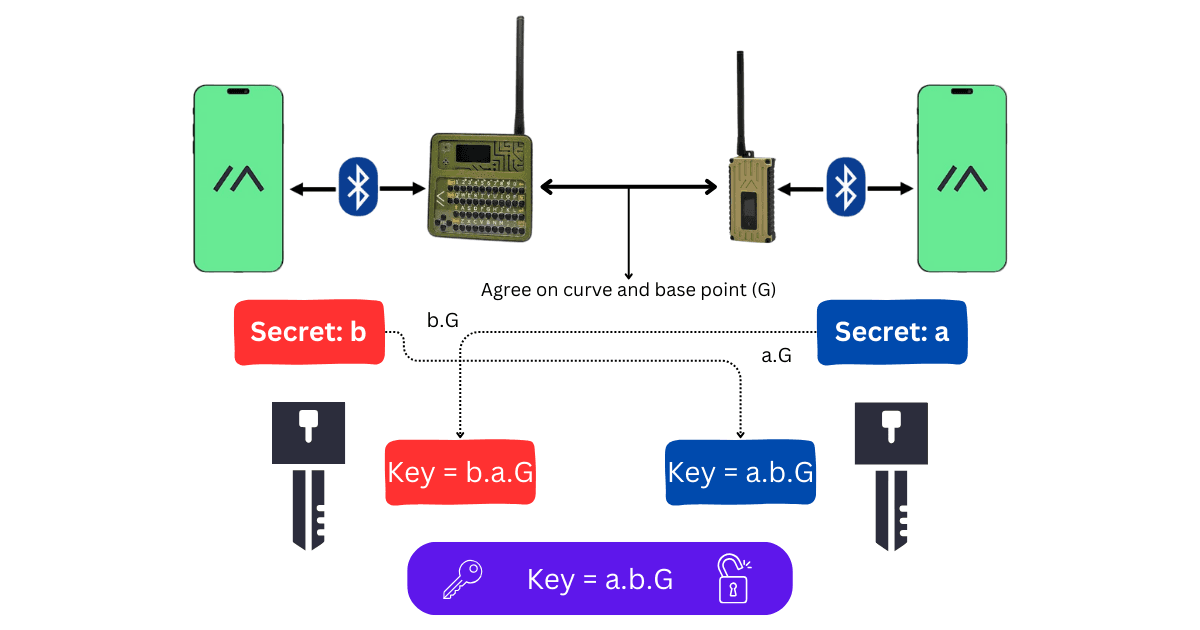
The big idea is simple: the public key is meant to be shared so other nodes can derive the shared secret needed for secure communication, while the private key stays confidential. Direct messages now use public-key cryptography, with each DM encrypted to the recipient’s public key and signed by the sender’s private key, so identity and integrity are built in. That is solid crypto, but it only helps if you preserve the keys and understand how admin access works before the node goes into the field.
The default channel is not private
One of the easiest mistakes is assuming a fresh node is private just because it is running Meshtastic. The project says its default primary channel uses the simple known key `AQ==`, which is fine for getting a mesh on the air but not fine if you are expecting actual channel privacy. If you want that privacy, you need to change the default or create a private channel.
That matters because the security model is not just about whether packets are encrypted in transit. It is also about whether your actual group has exclusive access to the channel material, and whether you have chosen a setup that fits the deployment. For a hobby node on your desk, the default may be harmless enough; for a relay you plan to leave unattended, it is the kind of shortcut that turns into a support headache later.
Managed mode can lock you out if you skip the dry run
Remote administration is where the operational risk gets real. In firmware 2.5 and later, Meshtastic uses Admin Key fields that store the local node’s public key on the remote node, and each remote node can hold up to three unique Admin Keys. On firmware 2.4.x and earlier, the equivalent path was a secondary channel named `admin` with a shared PSK.
That older model was powerful, but it also carried the classic mesh tradeoff: simpler access versus stronger separation. Meshtastic’s move to PKC in version 2.5 came after an earlier 2022 public/private-key proposal was revisited and reworked, because the team wanted a better balance between strong encryption and practical remote control on low-power LoRa gear. The problem for operators is not the design itself, it is enabling managed mode before proving you can still reach the radio through the exact remote path you plan to rely on.
If you flip managed mode on and discover too late that your admin path is not working, you can lock yourself out of configuration changes. That is a bad day on a bench; it is a much worse day when the node is mounted on a mast, tucked into a weatherproof enclosure, or sitting somewhere you cannot physically reset it without a trip.
Use this before-you-mount checklist
The safest way to approach a deployment is to treat the node like equipment you may need to recover blind.
- Back up the public and private keys before any firmware erase or reinstall. Meshtastic says those keys will be lost and regenerated during that process.
- Export the configuration with the CLI if you can, then store the key material in a password-protected note or, at minimum, capture it carefully in a screenshot.
- Decide whether the node will use firmware 2.5+ remote admin through Admin Keys or an older 2.4.x-style `admin` PSK path, and make that choice before the node goes out of reach.
- Verify that remote admin works while the node is still easy to touch. Do not assume managed mode is usable because the setting exists.
- If you are operating a team-managed mesh, remember that the web client can currently set only one Remote Admin public key, which can become a bottleneck if you expect broader administrative access.
That last point is easy to overlook. A single web-client key may be enough for one operator or one personal node, but it is not the same thing as a full multi-admin workflow. If you are building a small fleet, plan for that limitation instead of discovering it after the radios are already mounted.
Serial console and debug logs are not just developer toys
Meshtastic’s security page also calls out serial console and debug-log toggles, and those settings deserve the same planning mindset as keys and admin access. Disabling the serial console prevents the Stream API from initializing, which means you are cutting off one of the most direct recovery and inspection paths. Leaving debug logging available can be useful when you want live logs over serial or Bluetooth while connected through an API client.
The Python CLI makes that more practical than it sounds. Meshtastic’s command-line tool, installed through its Python package, can show packets as JSON and display serial debugging information from devices. For a node that is going into the field, that means you have at least one software path for checking what the radio is doing before you resort to physical access.
That does not mean you should leave every debug feature on forever. It means you should decide, ahead of deployment, which diagnostic doors you are willing to leave open and which ones you want shut once the node is stable. The mistake is not having tools. The mistake is treating those tools as harmless after you have already lost easy access to the hardware.
The operational rule is simple: plan recovery first
Meshtastic describes itself as an open source, off-grid, decentralized mesh network built on affordable, low-power devices, and that is exactly why the security discipline matters. Off-grid usually means remote, and remote usually means slower recovery if something goes wrong. The project’s own configuration guidance, which tends to favor CLIENT, CLIENT_MUTE, or CLIENT_BASE roles unless you have a specific reason to do otherwise, reinforces the same message: this is a system that rewards deliberate setup, not casual experimentation.
If you are about to mount a node, the right question is not whether the mesh will work on paper. It is whether you can still manage, recover, and rekey that node after a firmware erase, a bad config change, or a remote-admin mistake. Get the backups, test the admin path, and keep a recovery route in reserve, because once the box is bolted down and the battery is committed, the easiest time to fix a lockout is the moment before it happens.
This article was produced by Prism’s automated news system from verified source data, official records, and press releases, then run through automated quality and moderation checks before publishing. The system is built and supervised by the people who set the standards it runs under. Read our full AI policy.
Know something we missed? Have a correction or additional information?
Submit a Tip